
Desktop Sales Office12.09 - Download
You'll be able to download in few seconds.
Publisher Description
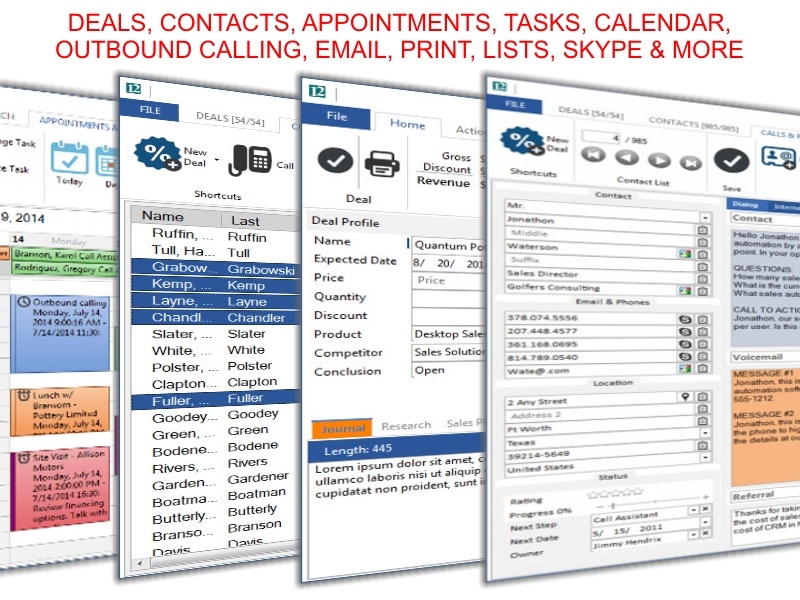
Sales professionals and sales teams sell more and spend less to master every contact, deal, campaign, appointment, and task within a framework built from the ground up for selling: Desktop Sales Office for Windows PC. Get the word out: Craft your messages, scripted talking points, and anticipated results and then target prospects and create demand with integrated e-mail, print and calling campaigns. A unique integrated browser is pre-wired to help you research your prospects along the way. Keep critical information about each contact and deal as you move through the sales cycle: primary contact, product, price, discount, revenue, probability, weighted revenue, expected order date, age, date last modified, progress, rating, next step, next step date, stage, status, features, sales owner, and three time stamped journals. Sales teams and mobile sales professionals share data via @Cloud online storage for sales data. Free support, updates and how-to courses in online Sales University (http://University.SoftwareOnSailboats.com). Mobile Sales Office version is available for Windows Mobile SmartPhones.
About Desktop Sales Office
This PIMS & Calendars program is available in English. It was last updated on 29 September, 2026. Desktop Sales Office is compatible with the following operating systems: Windows.
The company that develops Desktop Sales Office is Software On Sailboats. The latest version released by its developer is 12.09.
The download we have available for Desktop Sales Office has a file size of 8.4 MB. Just click the green Download button above to start the downloading process. The program is listed on our website since 2016-04-01 and was downloaded 0 times. We have already checked if the download link is safe, however for your own protection we recommend that you scan the downloaded software with your antivirus. Your antivirus may detect the Desktop Sales Office as malware if the download link is broken.
How to install Desktop Sales Office on your Windows device:
- Click on the Download button on our website. This will start the download from the website of the developer.
- Once the Desktop Sales Office is downloaded click on it to start the setup process (assuming you are on a desktop computer).
- When the installation is finished you should be able to see and run the program.
Program Details
System requirements
Download information
Pricing
Version History
version 12.09
posted on 2016-04-01
New major release. Built in customization for fields, lists, call scripts, and call results. Skype support added for outbound calling. Supports data sharing on Google Drive, Microsoft OneDrive, and DropBox for teams and mobile users.
version 10
posted on 2010-02-03
Last News: 0.60: new dpinfo95.dll, some improvement, rar and winace unpack improved
Disclaimer
External Download
We do not host Desktop Sales Office on our servers. We did not scan it for viruses, adware, spyware or other type of malware. This app is hosted by the software publisher and passed their terms and conditions to be listed there. We recommend caution when installing it.
The external download link for Desktop Sales Office is provided to you by apps112.com without any warranties, representations or guarantees of any kind, so access it at your own risk.
If you have questions regarding this particular app contact the publisher directly. For questions about the functionalities of apps112.com contact us.
